
Risk Register Software: Score & Treat IT Risks
By GRCompliance team
A risk register is the working record of what could go wrong with your information and systems. For each risk it records how likely it is, how bad it would be, who owns it, and what you are doing about it. It is the engine of an ISO/IEC 27001:2022 management system. Clause 6.1.2 requires a defined risk assessment process that identifies risks to confidentiality, integrity and availability, names risk owners, assesses likelihood and consequences, and evaluates the results against your risk criteria. Clause 6.1.3 then requires you to choose treatment options and controls, produce a risk treatment plan, and get the risk owners to approve the plan and accept the residual risk.
The standard does not tell you to use a spreadsheet, a heat map or a 5×5 scale. It tells you to be consistent: clause 6.1.2 asks that repeated assessments produce "consistent, valid and comparable results". Clauses 8.2 and 8.3 then require you to actually run assessments at planned intervals, and when significant changes happen, and to implement the treatment plan.
NIS2 is built on the same idea. Article 21(1) requires "appropriate and proportionate" technical, operational and organisational measures to manage the risks to network and information systems. Proportionality takes account of your exposure, your size and the likelihood and severity of incidents. Article 21(2)(a) names "policies on risk analysis" first. For the digital providers it covers, Implementing Regulation (EU) 2024/2690 spells out a full risk-management framework. It covers documented risk assessments, a risk treatment plan, a risk tolerance set in line with your risk appetite, and acceptance of residual risks by the management body (or accountable persons who report to it). It also requires review at least annually.
Why a risk register matters for security
Security budgets and attention are always limited. The register is how you decide where they go, and how you show you decided on purpose. Without it, priorities follow whoever shouted last, the most recent news story, or the vendor with the best demo.
What goes wrong without a working register:
- Controls with no reason. Teams implement controls because a checklist said so, while a real exposure (a single administrator account for a critical system, say, or one supplier everyone depends on) goes unnoticed.
- Risk accepted by nobody. Risks get "accepted" by default because no one with authority ever looked at them. ISO 27001 6.1.3 f) and the NIS2 Implementing Regulation both expect a named, accountable acceptance.
- Scores nobody can defend. If two people score the same risk 6 and 20, the register is noise. That is exactly what 6.1.2's "consistent, valid and comparable" requirement is there to prevent.
- A snapshot, not a process. A register built for the certification audit and never updated describes a company that no longer exists.
Auditors usually start with your method. They look at the risk criteria and the acceptance criteria, then sample risks and follow the thread: the scenario, the score, the owner, the treatment decision, the controls in the Statement of Applicability, and evidence that the treatment happened. They also look for dates, to see whether the assessment is repeated at planned intervals and after significant changes, as clause 8.2 requires. NIS2 supervisors have similar powers. For essential entities, Article 32(2) includes on-site inspections, security audits and "requests for evidence of implementation of cybersecurity policies". Article 33 gives comparable powers for important entities, used after the event (ex post).
Good practice and common mistakes
Agree the criteria before scoring anything. Write down what each likelihood and impact level means in your terms: money, downtime, regulatory exposure, customers affected. Then agree what level of risk you are willing to accept. Without this, scores are opinions.
Describe risks as scenarios. "Phishing leads to account takeover of a finance user and fraudulent payments" is assessable. "Cyber attack" is not. A good risk statement has a cause, an event and a consequence.
Score inherent risk honestly. Inherent risk is the risk before controls; residual risk is what is left after them. If you only ever score residual risk, you lose the argument for why your controls matter and what would happen if one failed.
One owner per risk, at the right level. The risk owner should have the authority to accept the risk or fund its treatment. Usually that is a business leader, not the security team.
Use all four treatment options. Mitigate with controls, transfer through insurance or contracts, avoid by stopping the activity, or accept, with the reasoning written down. Mature registers accept risks openly; immature ones pretend every risk is being mitigated.
Common mistakes:
- Hundreds of near-identical risks copied from a library, none of them specific to the business.
- Threats and vulnerabilities listed, but never linked to a risk anyone owns.
- Residual scores lowered by linking controls that are not actually implemented.
- A register that is never shown to management, so nobody with authority ever sees the top risks.
- Scoring workshops once a year and nothing in between, even after a major incident or change.
Starting in a spreadsheet? Use the free security risk register template. It includes a blank register and clearly fictional examples, with separate fields for the risk owner, treatment owner, current residual assessment, expected target assessment and next review. Check the mapping with a small sample before moving records into an application; an automatic import is not assumed.
How to do it in GRCompliance
GRCompliance is a free, self-hosted GRC platform. The screenshots come from the Latore LTD workspace. Latore LTD is a fictional demo company, and all of its risks are sample data.
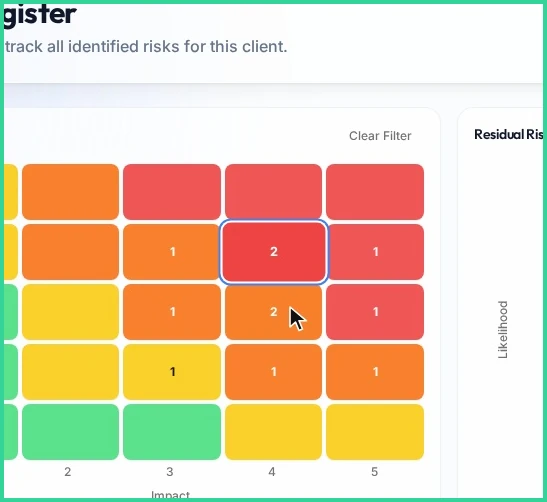
The register lives under Risk Management → Risk Register. Above the table sit two heat maps: inherent risk, plotted by likelihood and impact before controls, and residual risk after them. The red top-right corner of the inherent map holds the most serious risks. Comparing the two maps is a quick, honest check that your controls are doing something.

Click Add Risk to open the assessment wizard. It offers asset-based, scenario-based, process-based and vendor-based methods. Scenarios are often the easiest place to start, because business owners can discuss them without knowing the asset inventory. Give the risk a clear title and a short description of what could happen. Below the title, the threat and vulnerability lists from your libraries let you link the ones that apply, which keeps the wording consistent across the register.
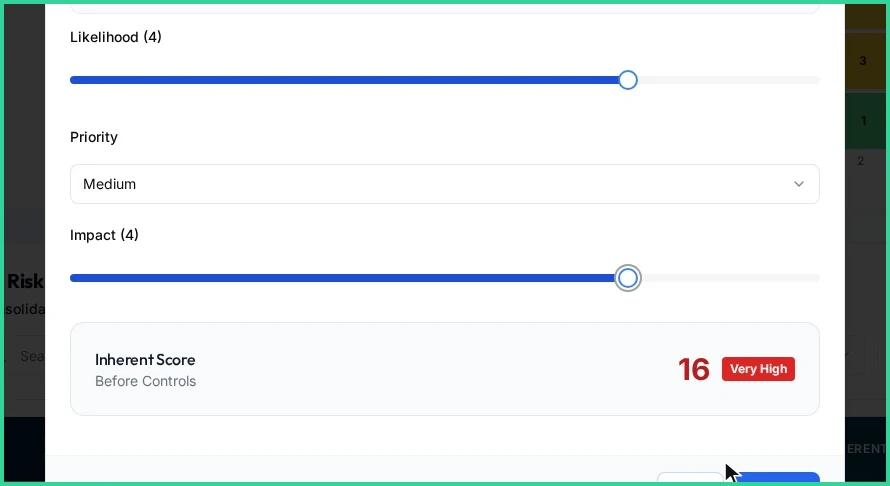
Next, score likelihood and impact on a 1–5 scale. In the example, likelihood 4 × impact 4 gives an inherent score of 16, which GRCompliance rates as very high. This is the point to lean on the criteria you agreed earlier, so the score means the same thing as everyone else's.
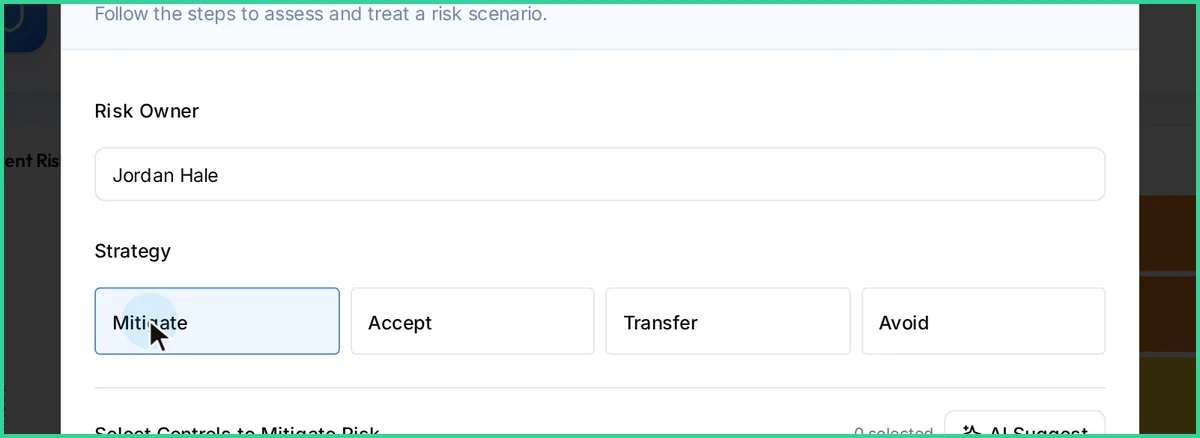
In the treatment step, assign the accountable risk owner and choose a strategy: mitigate, accept, transfer or avoid. This is the decision ISO 27001 clause 6.1.3 asks for, recorded against a named person.
If you mitigate, link the controls that reduce the risk. GRCompliance shows the projected residual score dropping as you add them, and the appetite check flags the risk if it is still above your risk appetite. That flag is the useful part: it tells you when you are about to accept more risk than you said you would, and that the risk needs more treatment or an explicit acceptance by its owner. Managing the controls themselves is covered in the controls management guide.
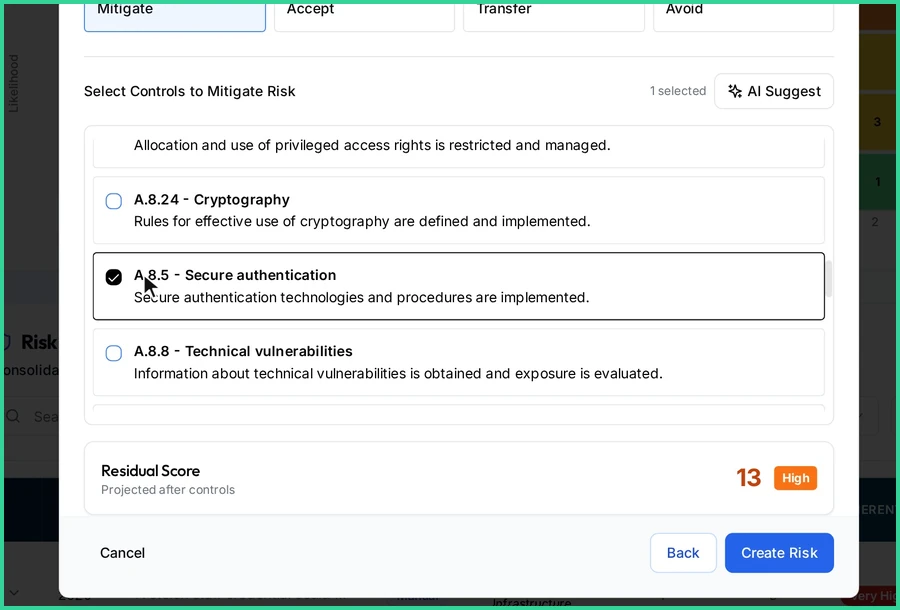
Click Create Risk and the new risk appears at the top of the register as a draft, with its owner, ready for review. For management reviews, use the heat map as a filter: click any cell to list only the risks at that likelihood and impact, and use Clear Filter to reset. Starting the review from the top-right cells keeps the conversation on what matters.
For day-to-day work, the table shows inherent and residual levels, treatment, owner and status. Sort by any column, or filter by status and keyword. Link each risk to the policies that address it, too. The policy management guide shows how from the policy side.
FAQ
What is the difference between inherent and residual risk?
Inherent risk is the level before any controls; residual risk is what remains after the controls you have implemented. GRCompliance shows a heat map for each.
Does ISO 27001 require a 5×5 risk matrix?
No. Clause 6.1.2 requires defined risk criteria and an assessment of likelihood and consequences that gives consistent, valid and comparable results. A 1–5 likelihood × impact scale is a common way to meet that, but not the only one.
Who should accept residual risk?
The risk owner. ISO 27001 clause 6.1.3 f) requires risk owners to approve the treatment plan and accept residual risks. For the providers it covers, the NIS2 Implementing Regulation requires acceptance by the management body or by accountable persons who report to it.
How often should the risk register be reviewed?
At planned intervals and when significant changes occur (ISO 27001 clause 8.2). The NIS2 Implementing Regulation (EU) 2024/2690 sets at least annual review of the risk assessment results and the treatment plan for the providers it covers.
Can I use the same register for ISO 27001 and NIS2?
Yes. Both expect a documented, repeatable risk process. One register, with controls mapped to both frameworks, avoids keeping two versions of the truth. See our NIS2 compliance page.
Watch the video
The video shows the full flow in GRCompliance, from an empty Add Risk form to a scored, owned and treated risk on the heat map.
Try it yourself
Try it with one real risk, such as phishing that leads to account takeover. Score it, assign an owner and link the controls you actually have, then see where the appetite check puts you.
- Explore the live demo: the fictional Latore LTD workspace used in the screenshots above.
- Download the free Community edition: free, open source, and self-hosted on your own infrastructure. The self-host quickstart gets you running.
- Visit grcompliance.com to see the platform and services, including Compliance-as-a-Service.
Related guides
- ISO 27001 risk register template for a small team
- Risk register spreadsheet migration: a safe checklist
- Backup restore test evidence for ISO 27001
- ISO 27001 Policy Management: Create, Approve & Publish
- ISO 27001 Controls Management: Track Annex A Status
- ISO 27001 Evidence Collection: Track Audit Evidence
- ISO 27001 Statement of Applicability (SoA) Guide