
Risk register spreadsheet migration: a safe checklist
The hardest part of moving a risk register is not moving the rows. It is preserving what the rows mean.
If you maintain the spreadsheet, you probably know which names are old, which scores use an earlier method and which treatment decision is explained in another file. An application will not automatically inherit that knowledge.
A risk register records scenarios, assessments, owners and treatment decisions so the organisation can act on uncertainty. Migration should preserve that decision trail, not merely produce a cleaner screen.
This risk register spreadsheet migration checklist helps you prepare, map, pilot and verify the move. It does not assume that your destination offers a bulk importer, that every spreadsheet field has a direct equivalent, or that changing software improves the underlying assessment.
What matters this week, and what can wait
This week, preserve a read-only copy of the working register and identify who can authorise the move. Choose a small but varied pilot: an open risk, an accepted risk, a risk with several actions and a closed record with history.
Find out how each will be represented in the destination before committing the whole library. Start with fictional or appropriately protected data when evaluating a public demo.
A complete historic cleanup and a redesigned scoring model can safely wait until you know what the migration must preserve. A missing risk owner, broken evidence reference or unrecorded acceptance cannot be waved through merely to meet a switch-over date.
Your useful result today is a field map and a pilot acceptance checklist that someone other than the spreadsheet's author can use.
Define success before selecting the transfer method
Agree what must remain true after the move:
- Each risk keeps a stable reference and recognisable scenario.
- The accountable owner can be identified.
- Assessment method, reasoning and dates remain understandable.
- Treatment actions retain their owners, states and due dates.
- Acceptance decisions retain authority, conditions and review points.
- Relevant control, evidence and history references remain retrievable.
- Access remains appropriate for the sensitivity of the information.
Write down the limitations you will not accept, such as losing acceptance conditions or confusing expected future risk with today's assessment. These are decision-quality issues, not cosmetic differences.
Also agree who approves the pilot, the switch and any rollback. Rollback means returning to the previous controlled working arrangement if the new one fails acceptance criteria. It requires a plan for changes made during the attempt, not just possession of an old file.
Clean the source without erasing its history
Resolve duplicate risks carefully
Two rows may use similar words but describe different services, consequences or owners. Do not merge them simply because the titles match.
Where a merge is justified, record the retained reference, retired references, reasoning and where the original records can be found. Preserve their treatment and acceptance history. Deleting an inconvenient duplicate can otherwise remove a decision you still need to explain.
Make ownership explicit
Replace ambiguous labels such as “technology” with an accountable person or clearly governed role. Confirm current ownership with the relevant service lead.
Keep the risk owner distinct from action owners. The risk owner is accountable for the business decision; an action owner delivers a specific treatment task. One person may hold both roles, but a migration should not collapse the distinction accidentally.
Explain inconsistent scoring
Identify the method and version behind each assessment. An older “high” and a newer numeric score may not represent the same judgment. Do not translate them by colour alone.
If reassessment is needed, treat it as a new dated decision. Keep the original assessment and reason for the change rather than making the migration appear to have rewritten history.
Map the concepts, not just column names
Download the blank migration mapping worksheet, see the fictional sample, or use the workbook. No registration is required. The destination fields in the sample are evaluation questions, not confirmed application import fields.
| Source concept | What to establish in the destination | Validation question |
|---|---|---|
| Risk reference and scenario | Stable identity and full context | Can the owner recognise and retrieve the same risk? |
| Inherent assessment | Assessment before the specified controls | Is the original method and reasoning preserved? |
| Current residual assessment | What remains with today's operating controls | Has planned work accidentally reduced the current assessment? |
| Target residual assessment | Expected position after verified treatment | Is the expectation distinct from today's conclusion? |
| Treatment actions | Separate task, owner, due date and state | Are all actions retained, including multiple actions per risk? |
| Acceptance decision | Authority, rationale, conditions and review | Can someone establish who accepted which exposure? |
| Controls and evidence | Valid relationships or protected references | Can an authorised reviewer still retrieve the original? |
| Historic decisions | Accessible audit or change history | Can the previous assessment be reconstructed? |
If the destination has no equivalent field, choose an explicit, controlled method to retain the information. That could be a supporting decision record with a stable reference. Do not silently discard data because the new form is shorter.
One spreadsheet cell may contain several actions, owners or dates. Split it only with a documented mapping so relationships remain intact. A row count alone will not catch a missing action after that change.
Preserve a usable source snapshot and export
Keep the original workbook, a dated export of its relevant data, the assessment-method notes and supporting files or references. A comma-separated export can aid comparison, but it may lose formulas, comments, formatting, linked sheets and version context. It is not a complete substitute for the original workbook.
Record which filters, hidden rows and archived sheets were included. If the live spreadsheet uses external links or formulas, preserve the basis for calculated results and check whether exported values reflect the intended state.
Protect migration copies like the original register. Risk descriptions may reveal sensitive weaknesses or contract information even when they contain no passwords. Limit working access, use an approved transfer method and set a disposal plan for temporary copies.
Do not upload actual risk records to a public demo. Software cannot make legal determinations about data-sharing permission or retention; obtain qualified advice where obligations are uncertain.
Pilot a small, varied sample
The following pilot set is wholly fictional teaching material. It describes no client or real migration.
| Practice record | Why include it? | What to check |
|---|---|---|
| EXAMPLE-R01: open recovery risk | Has several treatment actions | Owners, deadlines and current versus target assessment survive |
| EXAMPLE-R02: time-limited acceptance | Has conditions and review triggers | Acceptance authority and expiry remain visible |
| EXAMPLE-R03: closed access issue | Has historical evidence references | Closure does not remove the supporting history |
| EXAMPLE-R04: merged supplier entries | Has retired reference numbers | Old identifiers still lead to the retained decision trail |
Use a transfer method confirmed for your actual edition and environment. Manual entry may be sensible for a small pilot. If an import exists, check its documented format and limitations; this guide does not supply an unverified import specification.
Ask a risk owner and a reviewer to inspect the results. The person who wrote the mapping can miss an assumption that is obvious to someone reading the record for the first time.
Validate relationships as well as totals
Compare source and destination counts, but do not stop there. Where records were split or merged, explain the expected difference.
Open each pilot record and check the scenario, owner, method, assessment, treatment and acceptance. Follow the evidence links using an appropriately authorised account, not only the migration administrator's broad permissions.
Check dates, time zones where relevant, date formats and blank values. “No review date supplied” is different from “review not required”. A numeric zero can mean a real score, an empty default or a failed conversion; investigate rather than assuming.
Record each validation result, defect, owner and retest. A pilot with unresolved material defects is not a successful pilot merely because all rows arrived.
Rehearse rollback before the switch
Define a cut-off point and the authoritative working record during the transition. Avoid two registers being edited independently with no reconciliation rule.
If there is a short freeze on changes, agree how urgent new risks or incident-related updates will be recorded. If parallel working is necessary, maintain a dated change log with an owner responsible for reconciliation.
Test how you would return to the previous controlled register if a significant defect appears. That includes recovering updates made after the source snapshot, restoring authorised access and telling users which record is authoritative. Do not overwrite new decisions with an older file in the name of rollback.
Backups of the destination matter too, but application restoration should be handled by the responsible operator using a tested procedure. This article is a governance migration guide, not a production restore command sequence.
Switch only when the owners can work with the result
Approve the move against the agreed criteria, then give owners a short walkthrough of their actual tasks: finding a risk, reading the decision, updating an action and requesting review.
Keep the old register as a clearly labelled, protected historical record for an agreed period. Stop routine editing there after reconciliation. Schedule a follow-up review to find issues that a pilot did not expose.
Read the risk-register software guide and moving beyond a spreadsheet for the wider operating context.
GRCompliance Core's public documentation confirms a risk register and scoring, controls and linked evidence. Those capabilities make it a destination you can evaluate; they do not establish a compatible bulk importer, automatic relationship conversion or complete preservation of your spreadsheet history.
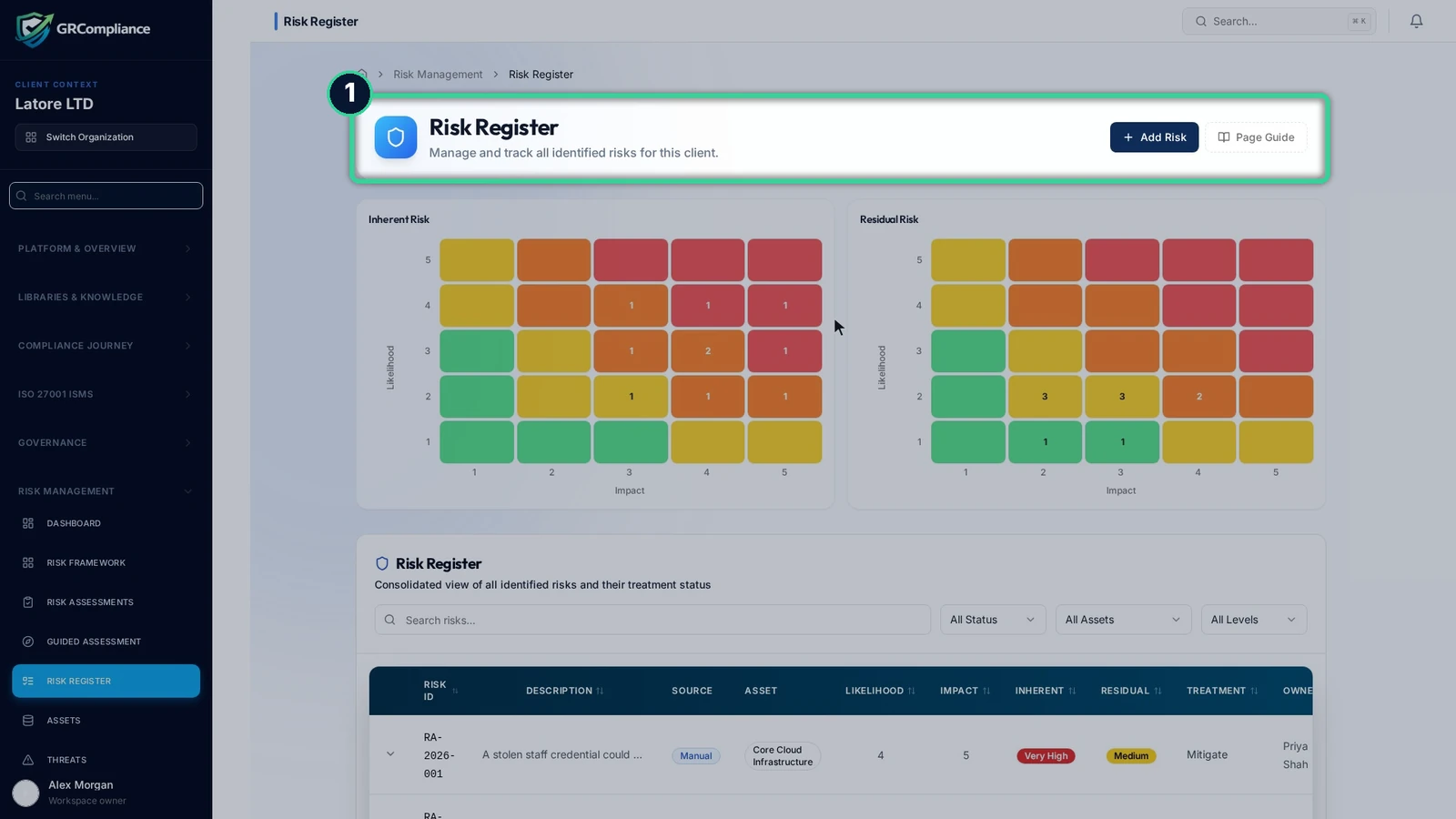
Try the live demo with fictional data only, or inspect the free open-source Core. A careful pilot is more valuable than an untested promise of effortless migration.
Frequently asked questions
Can I import a spreadsheet directly into GRCompliance?
This guide does not verify a direct importer or import format. Check the capabilities and documentation of your chosen edition before selecting a transfer method. Pilot the method and inspect the results.
Should I change the scoring method during migration?
Separating the two changes usually makes validation easier. If a reassessment is necessary, record it as a dated decision with the original method and reasoning preserved, not an unexplained conversion.
Is matching the number of risks enough validation?
No. Check treatment actions, owners, acceptance conditions, assessments, evidence references and history. Split or merged records may change totals legitimately, but every difference needs explanation.
What does a usable rollback plan include?
It identifies the authoritative register, preserved source, decision owner, rollback trigger and method for reconciling updates made during the move. An old workbook alone does not preserve new decisions.
Sources
Reviewed 7 November 2026. The mapping and migration checks are editorial operational guidance, not an official standard form or an application import specification.
- GRCompliance Core documentation: verified risk-register, scoring, control and evidence capabilities; no importer assumed.
- GRCompliance public product homepage: self-hosted product positioning.
- International Organization for Standardization: information security management standard overview: risk-based management context; clause references 6.1.2, 6.1.3 and 7.5, paraphrased rather than reproduced.
Try the live demo
Open the public demo to see the product. Use fictional data only.